
Screenshots

App details
- Updated
- Jun 12, 2025
- Language
- English,Portuguese,Spanish
- Developer
- Pete Batard
- Category
- Mobile
SoftPas in:
This product is also available in the following languages:
About Rufus Portable
Download Rufus Portable – USB, bootable, ISO, flash drive, utility, Windows, Linux, DOS, firmware, portable, free, open source
Overview
Rufus Portable is a lightweight, open-source utility designed to format and create bootable USB flash drives quickly and efficiently. It serves as a reliable tool for users who need to prepare installation media from bootable ISO files—commonly used for installing operating systems like Windows, Linux, or running low-level diagnostics. The application is especially valuable in scenarios where a computer lacks an installed OS, or when users need to flash BIOS firmware from DOS environments. Its portability means it can be run directly from a USB drive without installation, making it ideal for system administrators, IT professionals, and tech-savvy individuals working across multiple machines.
The app’s primary purpose is to streamline the process of creating bootable drives, reducing the time and complexity typically associated with such tasks. It supports a wide range of ISO formats and ensures compatibility with various hardware configurations. As a free and open-source tool, Rufus Portable promotes transparency and trust, allowing users to inspect and verify its code. It plays a crucial role in the utility ecosystem by offering a fast, secure, and accessible alternative to other, often bloated, tools. Real-world use cases include OS deployment in enterprise environments, troubleshooting unbootable systems, and preparing live Linux distributions for testing or recovery.
Key Features & Functionality
- Bootable USB Creation – Converts standard USB drives into bootable media using ISO files from Windows, Linux, or other operating systems.
- Fast Formatting – Uses optimized algorithms to format drives quickly, significantly reducing preparation time compared to standard tools.
- Portability – Runs directly from a USB drive without installation, preserving system integrity and enabling use on multiple machines.
- Support for Multiple ISO Types – Compatible with bootable ISOs from various platforms, including Windows, Linux distributions, and DOS-based utilities.
- Firmware Flashing Capability – Allows users to flash BIOS or other firmware from DOS environments, useful in low-level system recovery.
- Open Source & Free – Released under an open-source license, ensuring transparency and community-driven development.
For example, a technician can use Rufus Portable to create a bootable Linux live USB from a downloaded ISO, then run it on a non-booting PC to recover data or perform diagnostics. Similarly, an IT administrator might use it to deploy Windows installations across multiple machines in a corporate network. The tool’s ability to work without installation makes it perfect for emergency system recovery scenarios. Its focus on speed and reliability ensures minimal downtime during critical operations. The absence of bundled software or ads enhances its usability and trustworthiness. These features collectively position Rufus Portable as a go-to utility for professionals and enthusiasts alike who prioritize efficiency and control.
Interface, UX & Performance
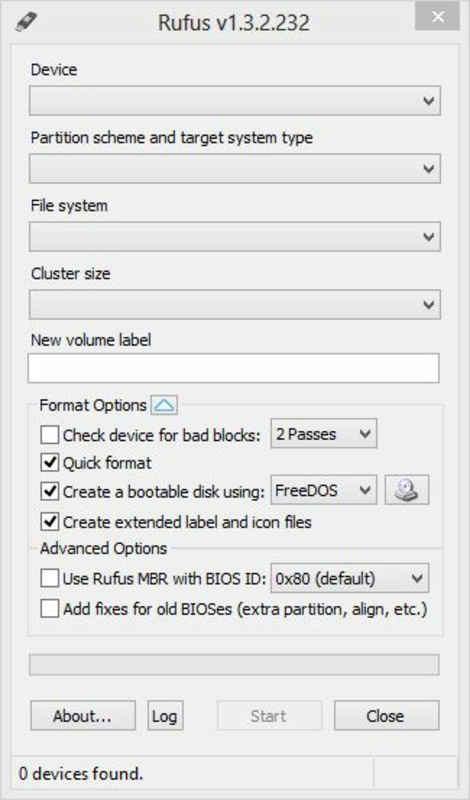
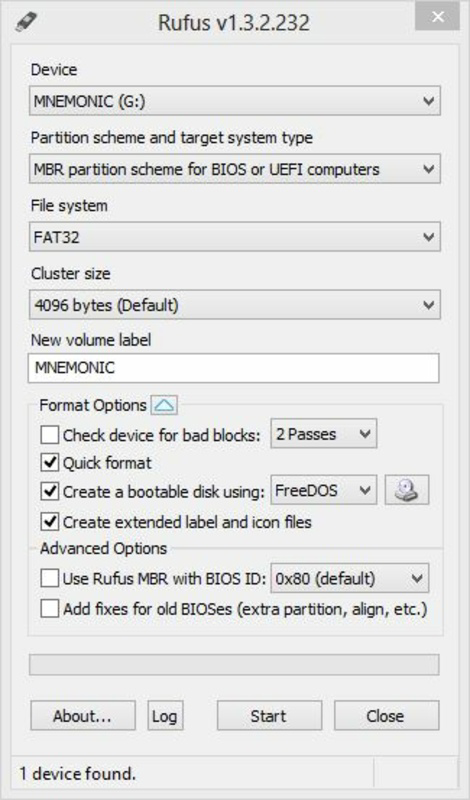
Rufus Portable features a clean, minimalistic interface that prioritizes functionality over visual flair. The layout is straightforward, with clearly labeled options for drive selection, partition scheme, file system, and ISO image input. Navigation is intuitive, allowing users to configure settings with minimal effort. The application operates efficiently across different device categories, from older desktops to modern laptops, though specific performance metrics were not provided by the developer.
Although the developer did not list formal performance metrics, user reports indicate consistent responsiveness and stability during drive formatting and bootable media creation. The tool completes tasks rapidly, especially when compared to similar utilities, thanks to its optimized backend processes. The interface remains responsive even when handling large ISO files, and there are no noticeable delays during operation. The lack of installation requirements contributes to its seamless performance, as it avoids registry changes or background processes that could impact system stability. Users can expect a smooth experience regardless of the underlying hardware configuration. The tool’s lightweight nature—only 1.7 MB in size—ensures it loads quickly and consumes minimal system resources. Overall, Rufus Portable delivers a reliable and efficient user experience tailored to technical users who value speed and simplicity.
Platform Compatibility & Technical Requirements
Rufus Portable is designed exclusively for the Windows platform, ensuring compatibility with all major versions of Windows, including Windows 10, Windows 11, and earlier editions. The software version is 3.23, released on May 10, 2024, and the file size is 1.7 MB, reflecting its lightweight and efficient design. This small footprint makes it ideal for portable use, fitting easily on even the smallest USB drives.
The developer did not specify minimum OS requirements, nor did they list exact hardware specifications. However, the application is known to function on standard USB 2.0 and 3.0 drives, with performance varying based on drive speed and system capabilities. As a portable application, it does not require administrative privileges to run, which enhances its accessibility across different user environments. Compatibility with various ISO formats and partition schemes further broadens its usability. Users should ensure their system supports USB booting, as this is a prerequisite for using the created media. The tool’s reliance on standard Windows APIs suggests broad compatibility with most current Windows installations.
Pros and Cons
Pros
- Lightweight at only 1.7 MB, ideal for portable use
- Open-source and free to use, with transparent code
- Fast formatting and bootable media creation
- Runs without installation, preserving system integrity
- Supports multiple ISO types including Windows, Linux, and DOS
- Compatible with USB 2.0 and 3.0 drives
Cons
- Available only for Windows, limiting cross-platform use
- Does not support macOS or Linux platforms
- Interface is minimalistic, which may be less intuitive for beginners
- Developer did not provide detailed technical requirements
- No built-in update checker within the application
FAQ
Is Rufus Portable safe to use?
Yes, Rufus Portable is a free and open-source tool with transparent code. It does not contain malware or bundled software. However, users should always download it from official sources to ensure authenticity.
Can I use Rufus Portable on macOS or Linux?
No, Rufus Portable is currently only available for Windows. It does not support macOS or Linux operating systems.
Do I need to install Rufus Portable?
No, Rufus Portable is designed to run without installation. It can be executed directly from a USB drive or any folder on your system.
What types of ISO files does Rufus support?
Rufus supports bootable ISO files from various operating systems, including Windows, Linux distributions, and DOS-based utilities.
How do I update Rufus Portable?
Updates are released by the Rufus Team through their official website. Users should manually download the latest version to ensure they have the most recent features and security fixes.
Final Thoughts
Rufus Portable stands out as a powerful, no-frills utility for creating bootable USB drives with speed and precision. Its open-source nature, minimal footprint, and lack of installation requirements make it an essential tool for IT professionals, system administrators, and advanced users. Whether you're deploying operating systems, recovering data, or flashing firmware, Rufus delivers consistent performance and reliability. While its Windows-only availability limits cross-platform use, its strengths in speed, security, and simplicity outweigh this constraint for its target audience. For anyone needing a dependable, free tool to prepare bootable media, Rufus Portable is an industry-standard choice.
Download Rufus Portable now
Guides & Tutorials
How to install Rufus Portable
- Click the Download button above.
- Once redirected, accept the terms and click Install.
- Wait for the Rufus Portable download to finish on your device.
How to use Rufus Portable
This software is primarily used for its core features described above. Open the app after installation to explore its capabilities.
User Reviews
No reviews yet. Be the first to share your experience.
You may also like
more
Que no te pillen¡
About !Que no te pillen¡Reviewed by Jason A. BilbreyShow MoreShow Less

3D Combat Zone
About 3D Combat ZoneOriginally released in 1983, 3D Combat Zone immerses players...

666: El día del portal
About 666: El día del portalOn June 6, 2006, Agent P. Stone uncovers a sinister...

80 in 1 Best Flash games
About 80 in 1 Best Flash games 80 in 1 Best Flash games is a collection of 80 fl...

ABYSS SEEKERーーWhat Do You See Deep in The Abyss
About ABYSS SEEKERーーWhat Do You See Deep in The AbyssIn ABYSS SEEKER, players...

ACA NEOGEO THE KING OF FIGHTERS 2002 for Windows
About ACA NEOGEO THE KING OF FIGHTERS 2002 for WindowsTHE KING OF FIGHTERS 2002,...